See the room before you buy a thing.

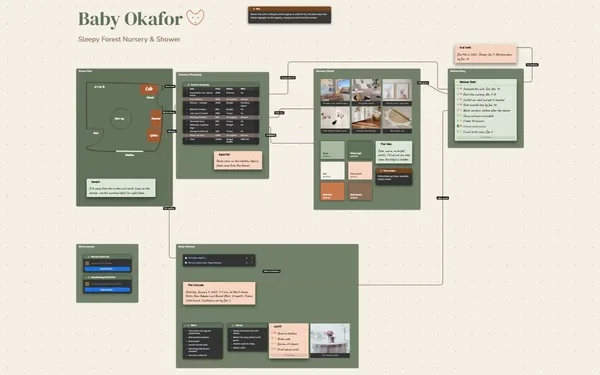
A room mood board that puts the photos you love, the paint colors and every piece you’re weighing next to the budget, so the look and the numbers agree.

Futur3 Board is in private beta. Invited accounts get every Subscriber feature free during the beta. No limits on your free boards, saved anywhere.

A room mood board for a mid-century living room: pictures, paint swatches and furniture picks, each linked to its price.

Why interior designers and homeowners put it on a board

Room mood board: inspiration pictures beside the palette

Off the phone, onto the wall

Hundreds of saved photos, screenshots and pictures from the store aisle. Drop them on one board, keep the ones that feel right, and the room you keep picturing is finally something you can look at.

Furniture picks beside fabric and paint swatches

Sofa, rug and paint together

The sofa, the rug, the paint chip and the curtain fabric sit next to each other, the way they will in the room. One look tells you the walnut table is one wood too many.

A connector from a budget row to the rug picture

Every price tied to its photo

A line from “Rug, 8×10 wool” in the budget table to the picture of the rug, labeled “shortlisted”. You never wonder which rug that $640 was for.

Three armchairs side by side over their price and comfort notes

Pick the armchair, finally

Three armchairs in a row, each with its price and a note on comfort. Side by side, the right one is usually obvious, and the other two stop haunting your tabs.

The drawn floor plan beside the palette

Feel the room before it arrives

Paint swatches, fabrics beside furniture, a quick floor plan with everything placed. Before a box arrives you can see how the room will feel, and that keeps you going through the paint fumes.
How it works

  1. Pin what you love. Photos, swatches and every piece you’re considering.
  2. Price it beside the pictures. A budget table, each row linked to its photo.
  3. Sketch the floor plan. Draw the room and drop the furniture where it goes.

What goes on the board

Pick a block to see where it sits on The Bennett Living Room’s board.

The lookPicks and budgetDecide and doThe Bennett Living Room — Warm Mid-Century RefreshTerracotta, olive and warm cream · walnut, wool and linen · done by the end of MarchThe terracotta w…Walnut sideboardReading cornerTerracottaOliveWarm creamwindowcoffeetablesofaarmchairruglampsideboardRust linenOatmeal boucléWalnutSofa, bouc…Coffee tab…CurtainsRug, 8×10…BudgetItemPricePickStatusSofa, bou…$1,890OatmealOrderedCoffee ta…$420WalnutRethinkCurtains,…$180RustOrderedRug, 8×10…$640Rust stri…DecidingArmchair$560–890One of th…DecidingFloor lamp$240BrassSavedPaint, 3…$165TerracottaBoughtTan leatherGreen velvetCane backPaint, order, deliverPrime the long wallPaint it terracottaOrder the sofaPick the armchairOrder the rugSofa arrives Mar 14Hang the curtainsArmchairsChairPriceComfortTan leather$890Firm, sits uprightGreen velvet$720Soft, deep seatCane back$560Light, a bit hardshortlisted

Questions

I’m not a designer. Is it hard to set up?

No. Drag in photos, add a table for the budget and a palette for the paint. Or paste your notes and shopping list and ask Claude to build the board.

Will it add up the budget?

No. Tables don’t calculate. Keep every price in the table so you can see it next to its photo, then export it as CSV to a spreadsheet when you want the total.

Can my partner decide it with me?

Yes. Invite them to edit (Subscriber) and you both work on the board at once, each pointer named. Leave an arrowed comment on the armchair you’re unsure about and settle it in the thread. Only the board’s owner needs Subscriber.

Is it really free?

Yes. No limits on your free boards, saved anywhere: make as many as you like, with as many pictures and blocks as you like. They save on your computer, in your browser, or in your own Google Drive or OneDrive. The $5 Subscriber plan adds share links to view, comment, present or edit together live.

Who keeps my boards?

You do. Every board is a file you own: on your computer, in your browser, or in your own Google Drive or OneDrive. If you stop subscribing, your boards stay right where they are.

Does it work offline?

Yes. Install it from your browser in one click and it opens and saves like any app, with no connection.

Start with the photos you love. Let the budget follow.

More boards like this