Five finals. One plan. You’ve got this.

An exam revision planner, or study planner, for finals week: your timetable, a checklist for every course and tonight’s work, on one board.

Futur3 Board is in private beta. Invited accounts get every Subscriber feature free during the beta. No limits on your free boards, saved anywhere.

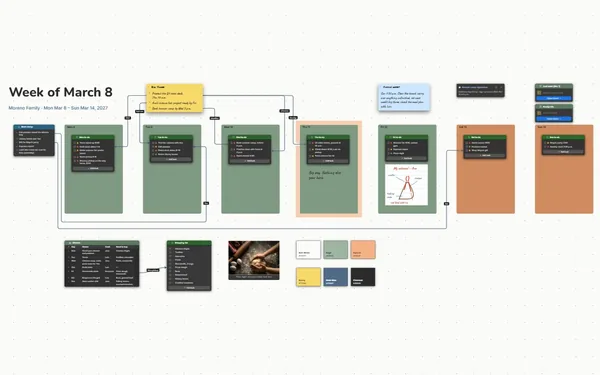
A revision planner board: the finals timetable linked to a dated study checklist for each course.

Why students put it on a board

Revision planner — the timetable: every exam with its date, time and room

Stop carrying five courses

The panic isn’t the studying. It’s trying to remember what’s when, for which class, and what you haven’t touched. Put every exam and chapter on the board and let it keep track.

The board zoomed out: timetable and course frames

See finals week at a glance

The timetable at the top, a frame for each course around it. One look says chem is Tuesday afternoon and you still haven’t done gas laws.

A line from an exam row to its checklist

Know what to open tonight

Each timetable row has its own connector socket. A line from CHEM 101, Tue Dec 15, to the chemistry checklist, and from tonight’s plan to its to-dos. Follow the line and start.

The calculus checklist, most items ticked

Watch the list shrink

Tick off Practice exam 1 and see what’s left. A week out, calc is nearly done and history needs two more evenings. Ready stops being a feeling and becomes something you can see.

The chemistry checklist split with Sam, beside the syllabus

Split the chapters with a friend

Invite the friend in your chem section by email to edit, and build the practice problem list together, each with your own pointer. Swap who covers which chapter. Only the board’s owner needs Subscriber.
How it works

  1. Drop in the timetable. Every exam with date, time and room, or import it as CSV.
  2. Give each course a checklist. Chapters and practice tests, dated, in the order you’ll do them.
  3. Work tonight’s line. Follow today’s plan to its to-dos and tick them off.

What goes on the board

Pick a block to see where it sits on Jordan’s Fall Finals’s board.

Calculus IChemistryPsychologyUS HistoryCompositionJordan’s Fall Finals — Dec 14–18Plan starts Mon Nov 30. Two weeks. One course at a time.ExamsCourseWhenRoomNeedsMATH 151Mon Dec 14,…Hale Hall 12078%CHEM 101Tue Dec 15,…Science Cent…89%PSYC 100Wed Dec 16,…Barton Audit…83%HIST 120Thu Dec 17,…Hale Hall 30588%ENGL 110Fri Dec 18,…Online portf…90%Calculus I checklistMon Nov 30: DerivativesWed Dec 2: Related ratesFri Dec 4: OptimizationMon Dec 7: Practice exam 1Thu Dec 10: Practice exam 2Sat Dec 12: Redo missesCHEM 101 syllabus.pdfCHEM 101 syllabus.pdfChemistry checklistNov 30: Stoichiometry · SamDec 1: Office hours · JordanDec 3: Gas laws · SamDec 8: Practice exam · bothDec 11: Weak spots · JordanDec 13: Formula sheet · SamSplit withSam: Sam doesproblem sets,I do officehours.CHEM needs an89. Biggestgap: mostevenings gohere.Calc final review sheet.pdfCalc final review sheet.pdfPsychology checklistTue Dec 1: Flashcards, ch. 1–⁠5Wed Dec 9: Flashcards, ch. 6–⁠12Tue Dec 15: Key terms runUS History checklistFri Dec 4: 30 ID termsFri Dec 11: Outline 3 promptsWed Dec 16: Timed essayComposition checklistSun Dec 6: Revise essay 2Sun Dec 13: Reflection letterFri Dec 18: Submit by 5 p.m.Two-week planDaysMain focusSecond focusNov 30–Dec 2Calc derivativesChem stoichiometryDec 3–5Chem gas lawsHistory ID termsSun Dec 6Composition revisionRestDec 7–9Calc practice exam 1Chem practice examDec 10–11Calc practice exam 2History outlinesDec 12–13Calc and chem reviewReflection letter50 minuteson, 10 off.Phone in theother room.Sleep bymidnightbefore everyexam.Pack thenight before:ID,calculator,two pencils,water.Spring semestertonight

Questions

Can I put dates on my to-dos?

Write the date into each item, like “Mon Dec 7: Practice exam 1”, and keep them in day order. Then the top unticked item is always what’s next, and nothing hides in a second calendar.

I have my exam schedule in a spreadsheet. Can I use it?

Yes. Tables import CSV, so the schedule drops straight in, one row per exam. Or paste your syllabus dates and ask Claude to build a first version of the board for you.

Can I show my plan to a parent or advisor?

Yes. Present it full screen (Subscriber), timetable first and then each course, one view at a time. A clear plan is easier to talk about than a worry, and easier to get help with.

Is it really free?

Yes. No limits on your free boards, saved anywhere: make as many as you like, with as many pictures and blocks as you like. They save on your computer, in your browser, or in your own Google Drive or OneDrive. The $5 Subscriber plan adds share links to view, comment, present or edit together live.

Who keeps my boards?

You do. Every board is a file you own: on your computer, in your browser, or in your own Google Drive or OneDrive. If you stop subscribing, your boards stay right where they are.

Does it work offline?

Yes. Install it from your browser in one click and it opens and saves like any app, with no connection.

Finals are coming. Your plan can be ready tonight.

More boards like this