Your best work, and the thinking behind it.

A portfolio presentation that holds every project, the sketches behind it and the story of the brief, ready to present full screen or put on your website (Subscriber).

Futur3 Board is in private beta. Invited accounts get every Subscriber feature free during the beta. No limits on your free boards, saved anywhere.

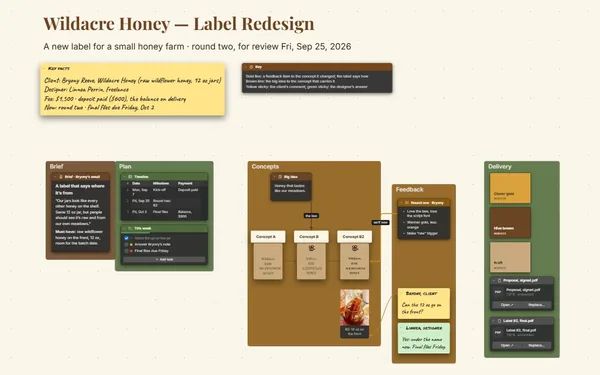
A portfolio presentation board: four illustration and brand projects with sketches, case studies and 3D packaging.

Why freelancers and creatives put it on a board

Portfolio presentation: a new project frame filling in beside the others

No more portfolio weekend

Finals in one folder, sketches in another, the case study half-written somewhere else. Add each project to the board as you finish it, and updating your portfolio stops being a dreaded weekend job.

A labeled connector from a sketch to the final cover

From pencil sketch to final cover

Draw a connector from the first pencil sketch to the finished book cover, labeled “three rounds.” The client follows the line and sees how you got there.

Four project frames in a grid, zoomed out

Your range in one view

A bakery identity beside a festival poster beside an app’s illustrations. Zoom out and a client sees your range at once; zoom in and each project tells its own story.

A friend’s sticky note on the festival case study

Make it better before the pitch

Invite a designer friend to comment, and they point an arrow at the case study that runs long or the image that should lead. Fix it Tuesday, pitch Wednesday. Only the board’s owner needs Subscriber.

The bakery frame: sketch, mockup and the case study

Pitch it full screen

The camera moves project to project, images fade in and case study points arrive one click at a time. Then export the board as a page for your website (Subscriber).
How it works

  1. A frame per project. The final pieces big, the sketches right beside them.
  2. Tell the story. Brief, process and result in an accordion under each project.
  3. Pitch or publish. Present it full screen, or export a page for your site (Subscriber).

What goes on the board

Pick a block to see where it sits on Rosa Kim’s board.

Honeyloft Bakery · two shops, 2025Saltmarsh Lantern Festival, 2025The Cat Who Painted the Sea, 2026Pebblewise · kids’ app (in progress)Rosa Kim — Illustration & BrandDesignKey factsBased in Portland, OR · worksremotelyFour projects, newest bottom rightOpen for: covers, identities,postersNext opening: March 2027Selected work 2024–2026 · books, food brands, festivals, appsAboutIllustrator and brand designer. Ten yearsof picture books, packaging and posters,painted by hand and finished on screen.Logo, round 1Cookie boxThe kraft boxHoneyPosterCrowd poster, 18 × 24…Stage bannerMain stage, 12 ft wideBottle (turn it)CrustServicesBrand identityPosters and festival artApp illustrationBook coversCase studyBriefProcessResultCase studyBriefProcessResultTheo (friend)Process runs long.Cut it to twolines, and put thesold-out bottle inthe Brief.FlourContactPortfolio siteBook a callWrite to RosaKeyLine from a service: the project thatproves itLine between pieces: how the sketch becamethe finalSticky note: a friend’s comment before thepitchRound 1: pencilThe cat, first…Final cover artWatercolor, 11…Saving buddyThe saving buddy, fir…The guideThe guide, on the tab…Still to addFinal six scr…Result: launc…Client quoteCase studyBriefProcessResultCase studyBriefProcessthree rounds

Questions

Can I put it on my own website?

Yes. Subscribers can export the board as a standalone HTML page to put on a website. Subscribers can also export a PDF to attach to proposals.

Can I pitch without installing anything on the client’s screen?

Yes. Present it full screen from your own laptop in the meeting. Afterward, send them a view-only link (Subscriber); it opens in any browser, with nothing to install.

Can I show 3D work, not just flat images?

Yes. The 3D model block shows packaging or a product a client can turn and zoom right on the board. For motion or prototypes, add stills and a link to where they live.

Is it really free?

Yes. No limits on your free boards, saved anywhere: make as many as you like, with as many pictures and blocks as you like. They save on your computer, in your browser, or in your own Google Drive or OneDrive. The $5 Subscriber plan adds share links to view, comment, present or edit together live.

Who keeps my boards?

You do. Every board is a file you own: on your computer, in your browser, or in your own Google Drive or OneDrive. If you stop subscribing, your boards stay right where they are.

Does it work offline?

Yes. Install it from your browser in one click and it opens and saves like any app, with no connection.

Your work deserves more than a folder.

More boards like this