Be known for what you’re good at.

A personal brand planner with your one-line promise, your voice, your look and six weeks of posts, each one linked to the work it should bring in.

Futur3 Board is in private beta. Invited accounts get every Subscriber feature free during the beta. No limits on your free boards, saved anywhere.

A personal brand planner board: a one-line promise, voice rules, brand colors, three content pillars and a six-week posting calendar.

Why creators and professionals put it on a board

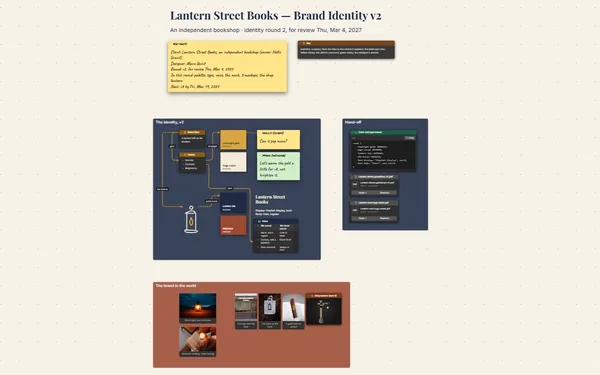
Personal brand planner: the Positioning and Voice frames

Stop rewriting your bio

What you want to be known for lives in half-finished drafts and shower thoughts. Put the promise, the voice and the post ideas on the board, and choose instead of circling.

Calendar rows with lines running on to the workshop offer

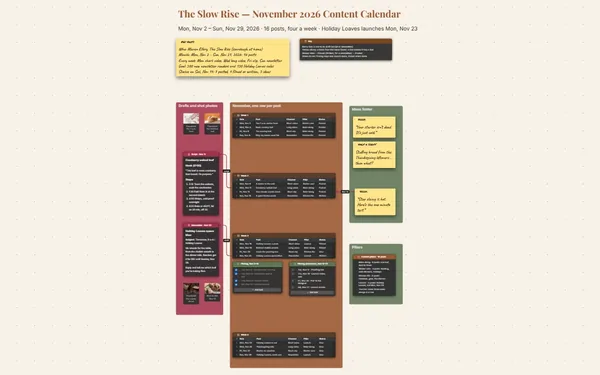
Every post has a point

A line from a content pillar to the Tuesday posts that serve it, and from those to the paid workshop. A post with no line pointing anywhere is a post you can skip.

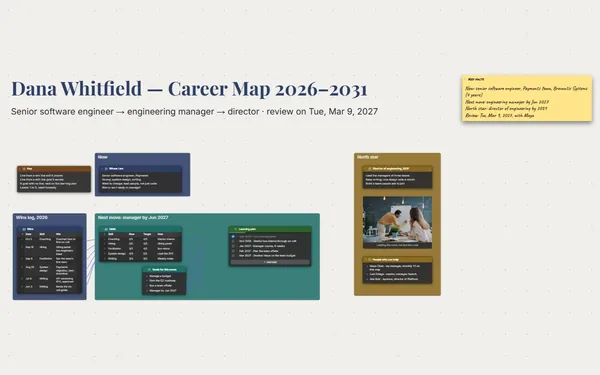
The Brand kit frame beside the six-week calendar

Does it all sound like you?

About photo, colors, type, pillars and calendar side by side. Zoom out and you can tell in seconds whether next week’s posts match the person your bio says you are.

The editor’s sticky note on a calendar row

Get a sharper headline

Invite an editor or coach to comment, and they point an arrow at the headline that’s trying too hard and suggest a better one. You reply in the thread (Subscriber).

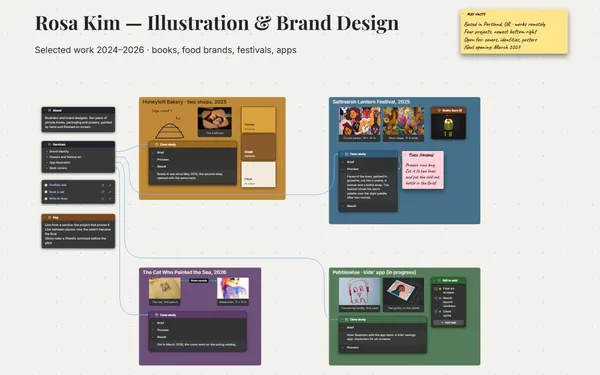
The three pillars, each with its posts

Explain yourself in one sitting

Present it to a coach, a manager or a new client: who you serve, how you sound, what you post and where it leads, one pillar at a time, full screen (Subscriber).
How it works

  1. Write the promise. One line: who you help and how. Then the voice rules.
  2. Pick three pillars. The topics you’ll own, each with a list of post ideas.
  3. Plan six weeks. A calendar table, every post linked to its pillar and offer.

What goes on the board

Pick a block to see where it sits on Nadia Reyes’s board.

PositioningPillars and six weeks of postsBrand kitVoiceNadia Reyes — Design Systems,ExplainedKey factsFor: product designers and front-enddevsPosts: Tuesdays, 9 a.m.Goal: 20 seats at the Dec 10workshopSold so far: 3 of 20KeyLine from a pillar: the posts that serve itLine to the workshop: posts that sell itSticky note: the editor’s commentTuesdays, 9 a.m.; status as of Nov 12Personal brand plan · Tuesday posts, Nov 3 – Dec 8, 2026 · workshop Thursday, Dec 10I help small teams builddesign systems peopleactually use.TokensColors as nam…One file, two…Built to lastFive buttonsWhen to forkAdoption15-minute tourDocs people r…About photoAt the desk, 2026InkWho I help: designers and front-end devson teams of 3 to 15, with nodesign-system team.SignalSix weeks of postsTuesdayFormatStatusPostNov 3CarouselPostedColors as n…Nov 10CarouselPostedFive buttonsNov 17VideoDrafted15-minute t…Nov 24TextDraftedThe only to…Dec 1CarouselIdeaWhen to forkDec 8Live Q&AIdeaDocs people…Sounds likePlain wordsShows the workOne idea a postNever says“Game-changer”“Best practice”Hustle talkAa SpaceGroteskPaperMara (editor)Too big. Try “Onefile, two apps”instead.Inter foreverything elseNRWorkshop, Dec 10Design Systems in a DayThursday · online · $24020 seats, 3 soldSample postCarousel cover, No…Last talkSpring meetup talkto the workshop

Questions

I’m not an influencer. Is this for me?

Yes. A personal brand is being clear about what you’re good at and saying it the same way every time. The board works the same for a consultant, a designer, a coach or someone changing jobs.

Can I bring in the calendar I already have?

Yes. Tables import and export CSV, so bring in your spreadsheet and send it back out. Every row gets its own connector socket, so each post can point to its pillar.

Can my editor and I work on it at the same time?

Yes. Invite your editor to edit and you both see each other’s pointers, names and selections live. Only the board’s owner needs Subscriber, and your editor signs in free with Google or Microsoft.

Is it really free?

Yes. No limits on your free boards, saved anywhere: make as many as you like, with as many pictures and blocks as you like. They save on your computer, in your browser, or in your own Google Drive or OneDrive. The $5 Subscriber plan adds share links to view, comment, present or edit together live.

Who keeps my boards?

You do. Every board is a file you own: on your computer, in your browser, or in your own Google Drive or OneDrive. If you stop subscribing, your boards stay right where they are.

Does it work offline?

Yes. Install it from your browser in one click and it opens and saves like any app, with no connection.

You have the expertise. Give it a shape people see.

More boards like this