A job application tracker that keeps your table of roles and stages, and links each one to its interview prep, your best stories and the follow-up due next.
Futur3 Board is in private beta. Invited accounts get every Subscriber feature free during the beta. No limits on your free boards, saved anywhere.
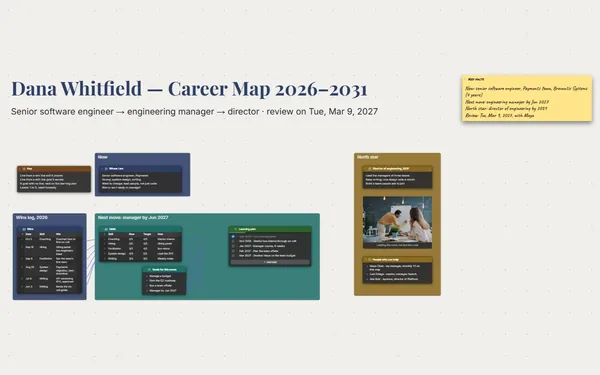
A job application tracker board: seven roles by stage, each linked to interview prep notes, stories and follow-ups.

Which company wanted the take-home, which recruiter promised a call Tuesday, which résumé you sent. One row per role, a note per interview, and the search gets lighter.

A line from Pemberlune’s final round to its prep note, and from your checkout redesign story to the questions it answers. Before the call, follow the lines.

Applied, screen, final, offer: the stage column shows what’s moving and what’s gone quiet, so you spend Thursday on the final round, not refreshing your inbox.

A north star note: a senior role, a product you’d use, a team that ships, your salary floor. When a rejection lands, it’s right there, pointing the search somewhere specific.

Invite a mentor to comment, and they point an arrow at the story that needs a sharper ending. You reply in the thread and rewrite it before Thursday. Only the board’s owner needs Subscriber.
Pick a block to see where it sits on Jordan Reyes’s board.
Yes. Save it as CSV and import it into a table. Each row gets its own connector socket, so you can link it to its notes. Export it back to CSV whenever you like.
Attach each version with a File block and draw a line from it to the roles that got it. When the recruiter calls, you know which one they’re reading.
Only the people you choose. Your boards stay on your computer, in your browser or in your own Google Drive or OneDrive. A link opens the board for anyone who has it, so for a job search, invite people by email instead.
Yes. No limits on your free boards, saved anywhere: make as many as you like, with as many pictures and blocks as you like. They save on your computer, in your browser, or in your own Google Drive or OneDrive. The $5 Subscriber plan adds share links to view, comment, present or edit together live.
You do. Every board is a file you own: on your computer, in your browser, or in your own Google Drive or OneDrive. If you stop subscribing, your boards stay right where they are.
Yes. Install it from your browser in one click and it opens and saves like any app, with no connection.