Three kids, three grades, one kitchen table.

A homeschool weekly planner for the whole family: the lessons you share, each child’s own checklist, and the year’s lessons counting up as you go.

Futur3 Board is in private beta. Invited accounts get every Subscriber feature free during the beta. No limits on your free boards, saved anywhere.

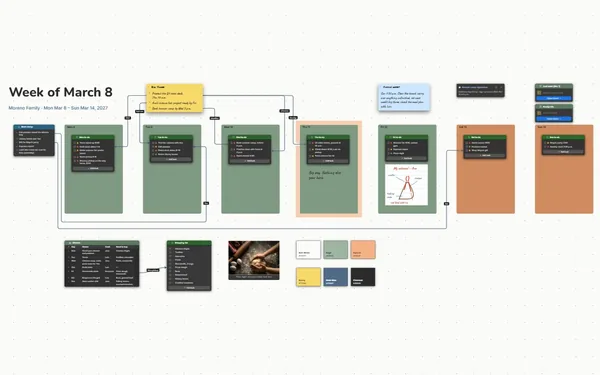
A homeschool weekly planner board: the week’s rhythm above a color-coded frame and checklist for each child.

Why homeschooling parents put it on a board

Homeschool weekly planner: the week’s rhythm, ready for Monday

Put the week down on Sunday

You’re the teacher, the principal and the cook, holding three kids’ lessons in your head. On Sunday night, put the week on the board. Monday morning, the plan is waiting.

Two children’s frames side by side, each in its color

Every child’s week side by side

Each child gets a frame in their own color, with the week’s rhythm above them all. One glance says Lucy is on math lesson 56 and Bea still has two phonics lessons.

Lines from the leaf study to the children’s to-dos

One lesson, three levels

A line from the shared nature-study lesson to each child’s version: a leaf rubbing for your first grader, a journal page for your fourth grader, an explanation for your seventh grader.

The subject table showing the lesson you’re on

Watch the year add up

The plan says Lesson 45 of 120, and the boxes get ticked each day. On a hard week, look back through the past weeks and see how far everyone has come.

One child’s frame with Thursday marked for the co-parent

Share Thursday with your partner

Invite your co-parent by email to edit. They take Thursday’s science, tick off what got done and add a note, live, from the next room or the office. Only the board’s owner needs Subscriber.
How it works

  1. Set the rhythm. What happens when, and who’s in each block.
  2. Fill each child’s frame. Their own to-dos for the week, in their color.
  3. Roll it forward. Untick, swap in next week’s lessons, keep past weeks linked.

What goes on the board

Pick a block to see where it sits on Harper Family School’s board.

Morning basketOwen, 7th gradeLucy, 4th gradeBea, 1st gradeHarper Family School — Week 13Mon Nov 16 – Fri Nov 20 · planned on Sunday, ready for Monday · nature walk Wednesday · co-op FridayRead-aloudThe Keeper of Saltmere Light,chapters 9–13, one chapter aday.HistoryPioneers on the Oregon Trail:map the route, read two diaryentries, pack a pretend wagon.Wednesday’s leavesWeek rhythm, Monday to FridayTimeBlockWho8:30Morning basketEveryone9:15MathEach at own level10:15Snack, outsideEveryone10:45Language artsEach child11:45LunchEveryone12:45Quiet readingEveryone1:30Project (Mon, Wed)Everyone6:30 p.m.Science (Tue, Thu)Dad, Owen, LucyLeaf study: why leaves change colorCollect five leaves on the walk. Chlorophyllfades; the yellow and orange were there allalong.This weekLeaf scienceAlgebra 41–44Lesson 45, quizSkate park essayNovel, ch. 6–10Wagon budgetTyping, 15 minThursday6:30 p.m.:sciencewith Dad(Mark ticksit off)This weekLeaf journalMath 52–55Math lesson 56Spelling list 14Cursive, p. 22Pioneer diaryThis weekLeaf rubbingsPhonics 31–33Phonics 34–35Adding to 10Letters p, q, rWagon coloringLesson by subjectOn lessonMath: 56 of 150Spelling: 14 of 36Books: 6 of 15Lesson by subjectOn lessonPhonics: 35 of 100Math: 22 of 120Letters: 18 of 26Wins this week:Lucy did a 2-digitmultiplication onher own. Bea reada whole page toGrandma.2026–27 PortfolioLesson by subjectOn lessonMath: 45 of 120Essays: 3 of 8Novels: 4 of 10Science: week 13 of 36Lucy’s journal pageBea at the leaf rubb…sciencejournalrubbingsquiz goes in portfoliomilestone

Questions

Can I plan each child separately?

Yes. Give each child a frame with their own checklist, and link the shared lessons to each child’s version with lines. Every to-do item and table row has its own connector socket.

Can I reuse the board next week?

Yes. Untick the to-dos, swap in next week’s lessons and link last week from a board of past weeks, so the whole year stays one dive away.

Is this for official records?

It’s a planning board, not a record-keeping system. Use it to run the week and see where each subject stands, and keep anything your state or a reviewer asks for in the format they ask for.

Is it really free?

Yes. No limits on your free boards, saved anywhere: make as many as you like, with as many pictures and blocks as you like. They save on your computer, in your browser, or in your own Google Drive or OneDrive. The $5 Subscriber plan adds share links to view, comment, present or edit together live.

Who keeps my boards?

You do. Every board is a file you own: on your computer, in your browser, or in your own Google Drive or OneDrive. If you stop subscribing, your boards stay right where they are.

Does it work offline?

Yes. Install it from your browser in one click and it opens and saves like any app, with no connection.

Let the board hold the week. You’ve got the kids.

More boards like this