Futur3 Board is in private beta. Invited accounts get every Subscriber feature free during the beta. No limits on your free boards, saved anywhere.
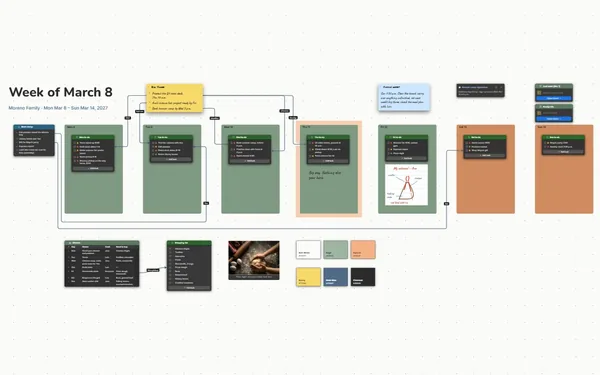
A family chore chart board: the week’s calendar with drivers, a chore chart with stars, a family reward and a message wall.
Why parents put it on a board
Stop being the family calendar
Soccer at 4:30, picture day, the permission slip, whose turn it is to feed the cat. Put it on the board, and you’re no longer the one everyone asks.
See who’s driving to what
A line from Thursday’s swim lessons to Grandma Pat, from Saturday’s game to Jess. Follow the lines on Sunday night and the pickup clash shows up then, not at 4:25 on Wednesday.
Watch the stars add up
13 of 30 stars, and a photo of the ice rink right beside them. When the kids can see how close they are, chores turn into a team goal instead of a nag.
Everyone keeps it up to date
Invite the grown-ups to edit, and keep the board open on the kitchen tablet for the kids to tick their chores. Grandma can be invited to comment. Only the board’s owner needs Subscriber.
Run a five-minute Sunday huddle
Put it on the TV full screen (Subscriber): the week ahead, each kid’s chores, dinners, the reward, one click at a time. Everyone knows their part before Monday morning.
How it works
Fill in the week. Each day’s plans, with who’s driving.
Hand out the chores. A row per chore, a tick per day, a star for each.
Huddle on Sunday. Five minutes on the TV, then everyone knows.
What goes on the board
Pick a block to see where it sits on The Hartley Family Hub’s board.
Questions
Do the kids need their own accounts?
No. Keep the board open on a family tablet or laptop and they tick their chores there. Grown-ups you invite to edit sign in free with Google or Microsoft; only the board’s owner needs Subscriber.
Does it send reminders or sync with our calendars?
No. It’s a board, not a calendar app, so there are no reminders and no syncing. It’s the one place the family looks at together to see the week and plan around it.
How do we start a new week?
Clear the ticks, change the dates and fill in what’s coming. Keep past weeks on their own boards, linked from this one, if the kids want to look back at their star totals.
Is it really free?
Yes. No limits on your free boards, saved anywhere: make as many as you like, with as many pictures and blocks as you like. They save on your computer, in your browser, or in your own Google Drive or OneDrive. The $5 Subscriber plan adds share links to view, comment, present or edit together live.
Who keeps my boards?
You do. Every board is a file you own: on your computer, in your browser, or in your own Google Drive or OneDrive. If you stop subscribing, your boards stay right where they are.
Does it work offline?
Yes. Install it from your browser in one click and it opens and saves like any app, with no connection.