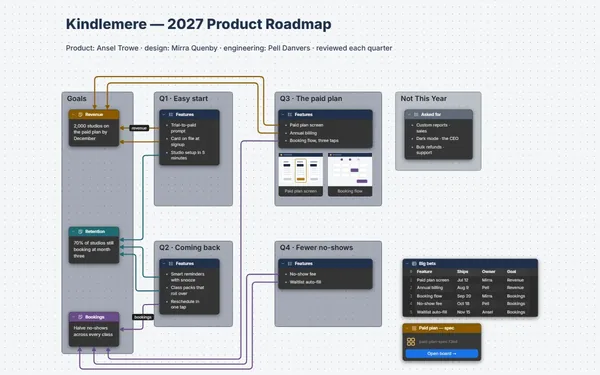
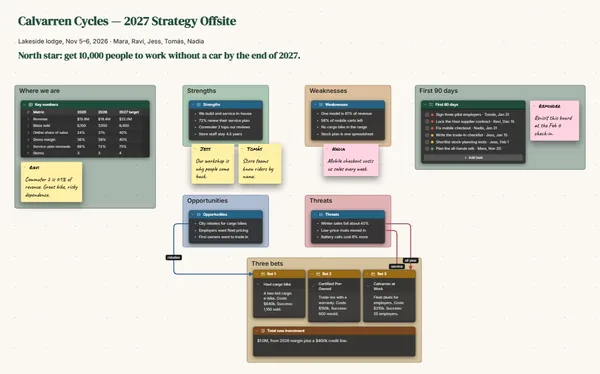
An OKR tracker for your team: objectives across the top, key results in tables, and a line from every key result to the work that moves it.
Futur3 Board is in private beta. Invited accounts get every Subscriber feature free during the beta. No limits on your free boards, saved anywhere.
An OKR tracker board: three objectives with key-result tables, each linked to the to-dos that move it.

Targets, owners, the project that’s slipping, all in your head and a dozen threads. Put it on one board, and Monday morning stops being a memory test.

Run a line from the “First response” key result to the weekend schedule to-do that moves it. When someone asks why, follow the line up to the goal.

Each check-in adds a row: the date, where the number is now, the blocker. Twelve weeks later the table tells the story of a quarter the team actually won.

Three objective frames across the top, each with its key results, and the work underneath. Zoom in and you spot the late task, and the number it’s holding back.

Invite the team by email and everyone updates their own key results during the meeting, pointers and names on screen. Only the board’s owner needs Subscriber.
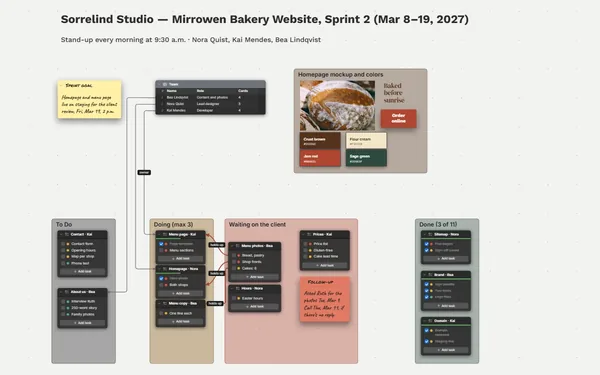
Pick a block to see where it sits on Ondrelle Software’s board.
Yes. Every table row and to-do item has its own connector socket, so a line runs from one key result to the exact to-dos that move it.
No. Tables don’t calculate. Type where each number stands every week, and export the table to a spreadsheet when you want the math done.
Yes. Tables export to CSV, and the whole board exports as an outline or a PDF (Subscriber). Or present it full screen at the review, one objective per camera view (Subscriber).
Yes. No limits on your free boards, saved anywhere: make as many as you like, with as many pictures and blocks as you like. They save on your computer, in your browser, or in your own Google Drive or OneDrive. The $5 Subscriber plan adds share links to view, comment, present or edit together live.
You do. Every board is a file you own: on your computer, in your browser, or in your own Google Drive or OneDrive. If you stop subscribing, your boards stay right where they are.
Yes. Install it from your browser in one click and it opens and saves like any app, with no connection.